MENU
  • Home
  • Company
  • Product
  • Support
  • Authorized Dealers
  • News
  • Newsletter
  • Contact
ACSL Inc.
  • Home
  • Company
  • Product
  • Support
  • Authorized Dealers
  • News
  • Newsletter
  • Contact
ACSL Inc.
  • Home
  • Company
  • Product
  • Support
  • Authorized Dealers
  • News
  • Newsletter
  • Contact
  1. Home
  2. Tutorials and Guides
  3. Updating the Firmware for the ACSL SAMO Thermal Payload

Updating the Firmware for the ACSL SAMO Thermal Payload

2026 6/05
Tutorials and Guides
June 5, 2026

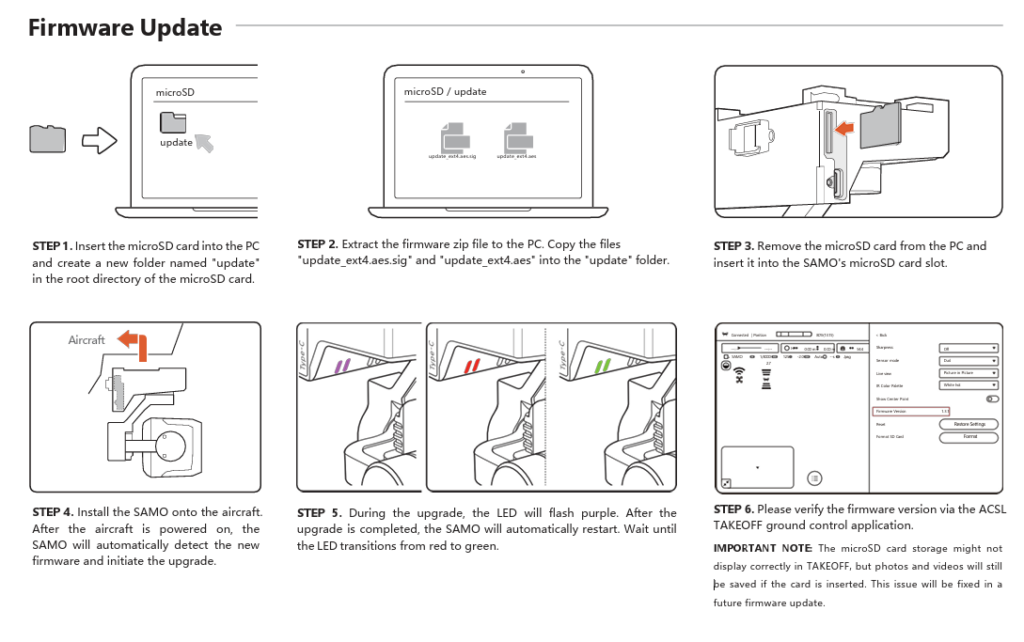
1/ Fully charge SOTEN batteries and controller

2/ A microSD card is needed, please format card before being used for the firmware update

3/ Download the firmware here: https://acsl-usa.com/support/

4/ Follow instructions below
Tutorials and Guides
  • ACSL Aircraft MAVLink Interface – Developer Guide (Part 1)
  • ACSL SOTEN RTK Module Setup Guide
icon-mail
Privacy Policy

© ACSL Inc. All Rights Reserved.